MULTI-AGENT PIPELINE · GMAIL · SUPABASE RAG · SINGAPORE
AI Customer Support Agent
The Problem
"During 9.9 and 11.11, the inbox would spike to 80+ emails in a day. Queries went unanswered for 2-3 days at exactly the moment customers were most likely to reorder."
The brand was handling all customer support manually: one person reviewing Gmail, copying product info from a spreadsheet, writing replies from scratch. Average response time was 18-24 hours on a normal day. During campaign periods, the queue became unmanageable. Late replies during peak sales periods meant lost trust at the worst possible time.
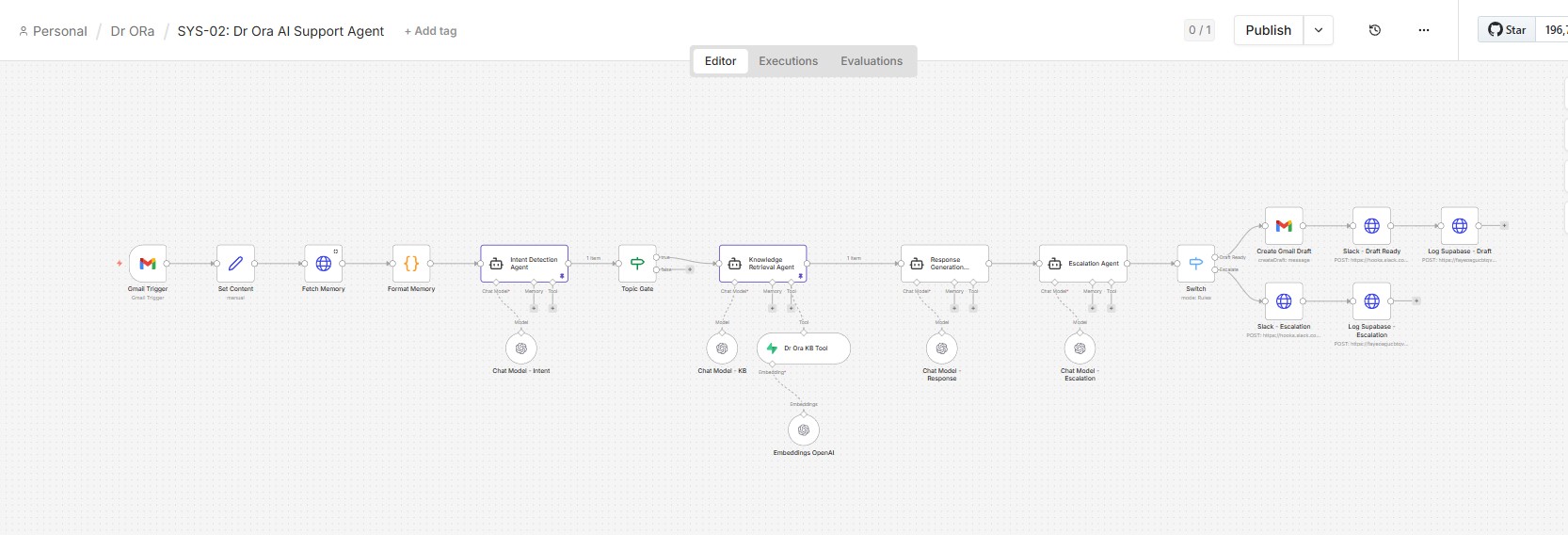
SYS-02: AI Support Agent Pipeline
Full n8n workflow: Gmail Trigger through Intent Detection, KB Retrieval, Response Generation, Escalation, and output routing.
Switch routes output to: Gmail Draft (confident replies) or Slack Escalation (complaints, health queries, low-confidence).
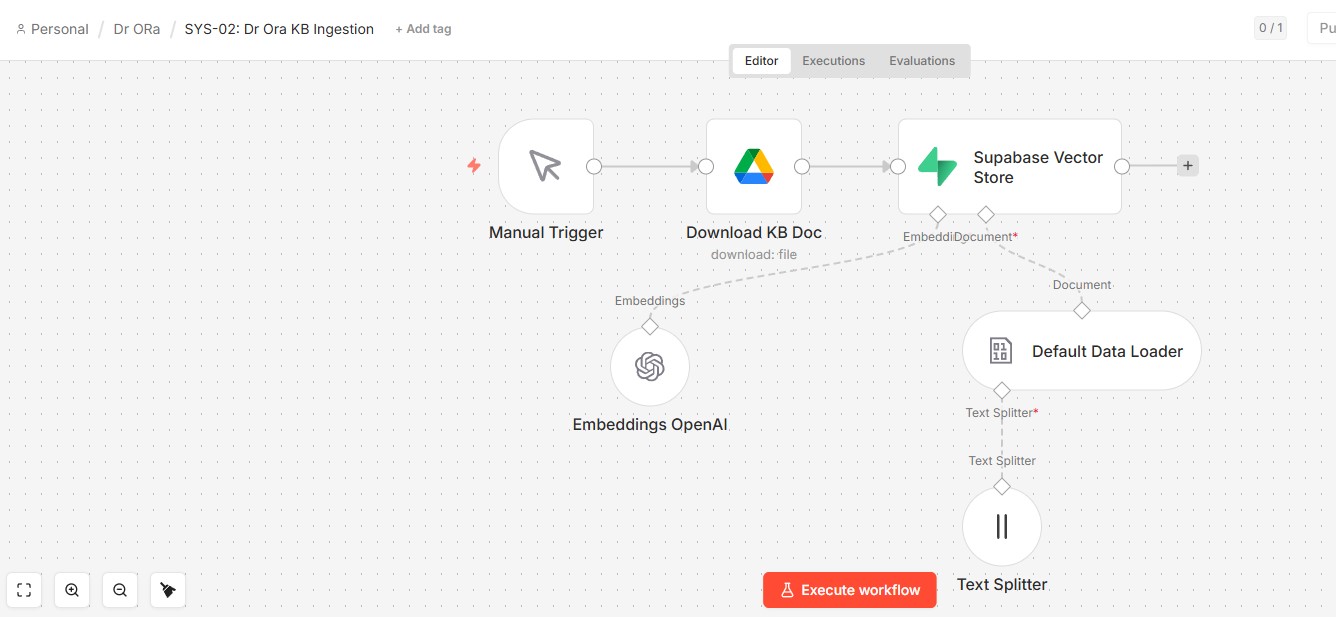
SYS-02: Knowledge Base Ingestion
A separate workflow keeps the knowledge base current. Product docs, FAQs, and policy files stored in Google Drive are downloaded, chunked, embedded via OpenAI, and upserted into Supabase pgvector. Run it whenever the KB changes: no manual reindexing, no stale answers.
How It Works
Intent Detection
The first agent classifies each email by topic, tone, and urgency before anything else runs. Downstream agents know exactly what they are dealing with before they start. A Topic Gate filters out non-support email so it exits the pipeline immediately.
Conversation Memory
Before retrieval runs, the workflow fetches the last 5 interactions with that customer from Supabase. Repeat contacts get contextual replies instead of being treated as strangers. First-time contacts get a clean slate.
Knowledge Retrieval
The retrieval agent searches a Supabase pgvector knowledge base of product info, ingredient lists, safety guidelines, and FAQs. It returns only what is relevant to this specific query. The agent never writes answers: it only finds sources.
Response Generation
A separate agent drafts a warm, brand-consistent reply as 'Rina, Customer Support' using only the retrieved KB content. If the KB does not contain an answer, the agent flags it for human follow-up rather than guessing.
Escalation Decision
The escalation agent reviews the draft with fresh context. Confident replies go to Gmail Drafts for one-click sending. Complaints, health-adjacent questions, and low-confidence replies go directly to Slack with full context attached.
The Key Insight
"Most support queries for a beauty brand are the same 12 questions repeated in different words. The problem is not that humans cannot answer them. It is that humans have to answer them every single time."
The system embeds the full knowledge base as vectors and retrieves only what is relevant to each query. A question about pregnancy safety retrieves pregnancy safety information. A question about collagen dosage retrieves collagen dosage information.
Rather than one large AI agent trying to do everything, the system uses four dedicated agents in sequence, each with a single job. If escalation logic needs tuning, only that agent changes. The rest of the pipeline is untouched.
A Real Example
During a sale period, a customer emailed asking whether a whitening supplement was safe during breastfeeding. Previously this would sit in the inbox for 24+ hours while the support person waited to check with the team.
The system retrieved the specific safety guidance from the KB within seconds, drafted an accurate reply citing brand guidelines and a recommendation to consult a healthcare provider, and flagged it as medium urgency. The escalation agent found it medically adjacent and routed it to Slack for a 30-second human review before sending. Total time from email to reviewed draft: under 2 minutes.
Results
Have a customer support inbox that needs automating?
Gmail, Outlook, Messenger: same architecture applies.